The intervalometer is the third of the photo drive modes, alongside single frames and burst. It captures a sequence over time: frames spaced by seconds or by an hour, repeated as many times as you ask for.
The unit of work is a program. A program holds its own capture settings, its own
ordered sequence of captures and pauses, and its own repeat count, saved under a name you
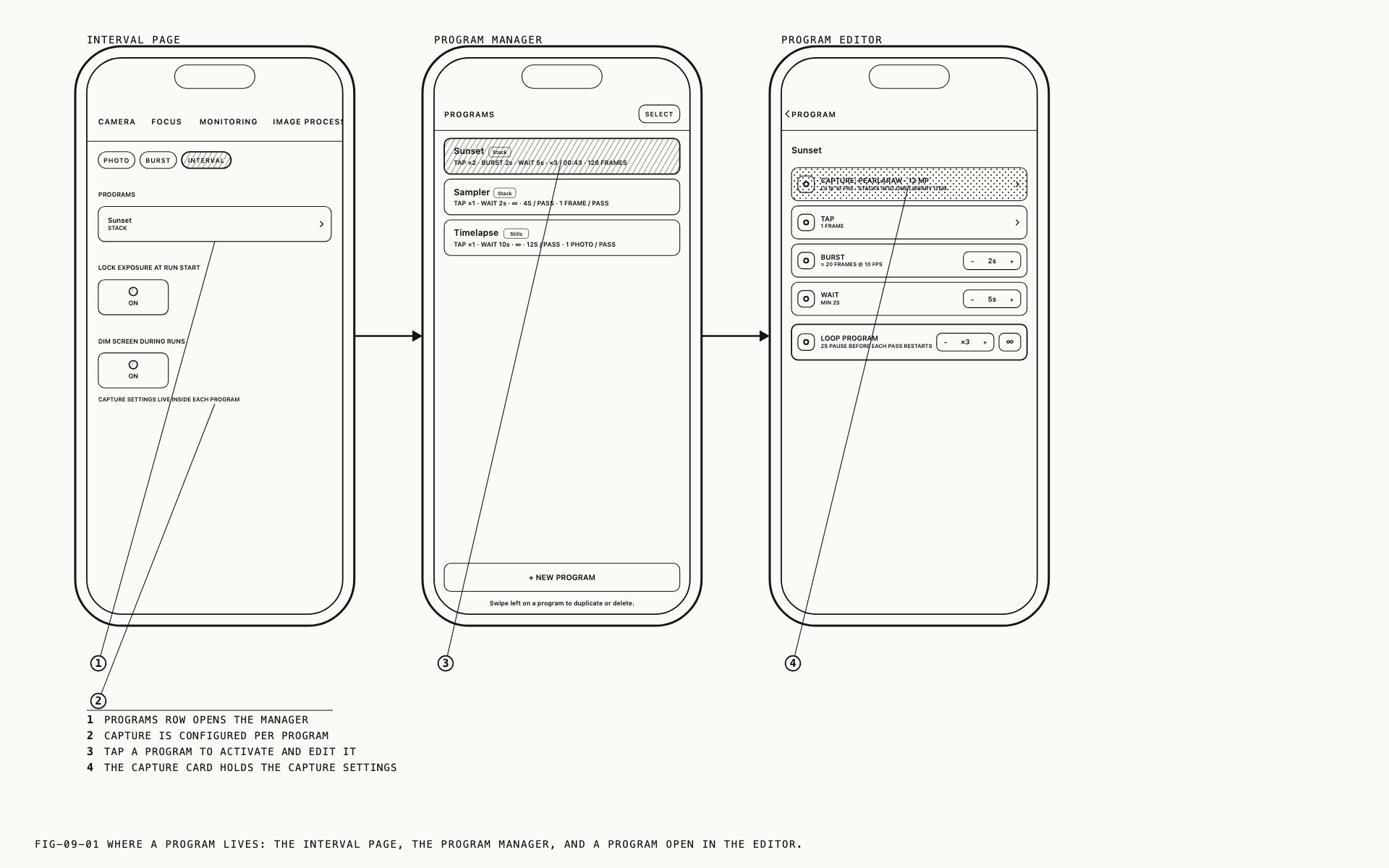
give it. Nothing on the Interval settings page describes what a capture is, and the page
says so under the two controls it does carry: CAPTURE SETTINGS LIVE INSIDE EACH PROGRAM.
The settings on the Photo page do not govern an interval run. Everything about the images
a run produces comes from the program you are running.
9.1 Programs
Where to find them: Settings → Camera → Interval.
The Interval page carries a PROGRAMS row, reporting the name and type of the active
program, and two toggles that govern how any run behaves. Tapping the row opens the
program manager.
Programs are listed most recently used first. Each row gives the name, the type, a shorthand of the sequence, and what the run will cost: how long it takes and how many frames or photos it produces. Those figures come from the program itself, so a program can be judged before it is ever run.
Tapping a row makes that program active and opens it for editing. + NEW PROGRAM creates
one and asks for its type first, because the type determines what the rest of the program
can contain. Swiping a row to the left offers duplicate and delete. DONE closes the
manager.
The active program is the one the shutter runs. Only one is active at a time.
Verana ships with a program named Sampler, so the list is never empty and the shape of a
program is visible before you build one. Edit it, duplicate it or delete it like any other.
9.2 What Lives Inside a Program
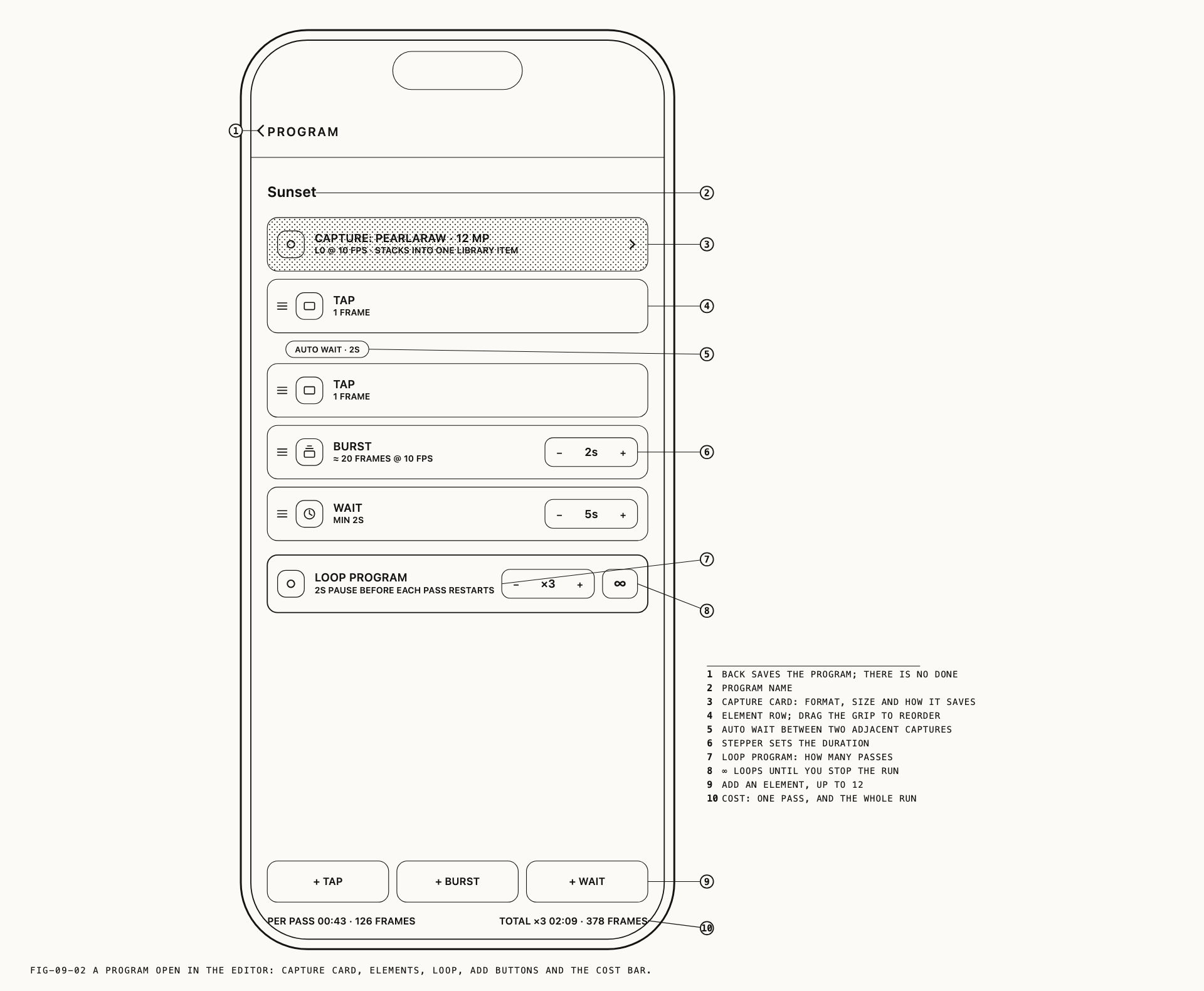
Every program opens with its capture card, pinned above the sequence. The card states what the program captures with, and tapping it opens those settings.
The first decision is the program type, set under PROGRAM TYPE, and it governs everything
below it.
| Stack | Stills | |
|---|---|---|
| Captures | PearlaRAW at 12MP | Individual photos in the format you choose |
| Settings on the card | QUALITY, BURST FRAMES PER SECOND | OUTPUT, RAW FORMAT, COMPRESSED FORMAT, RESOLUTION, FLASH |
| Sequence elements available | Tap, burst and wait | Tap and wait |
| Flash | Not used | Off, On or Auto |
| What reaches the media library | The whole run as a single capture | One capture per frame |
Stack holds a run together as a single capture, which suits sequences meant to be reviewed as one piece of material rather than as separate photographs. Stills produces separate photographs, each a full still capture in the format the card names, with flash available.
RAW FORMAT in a Stills program offers Apple ProRAW (12-bit) and PearlaRAW (12-bit).
48MP and the raw formats depend on the device, and options your device cannot use are
shown struck through. Still formats are covered in Chapter 7.
Switching a program between the two types keeps both sets of settings and keeps the sequence. Elements the new type cannot run are marked rather than deleted, so switching back restores the program you had.
9.3 Building a Sequence
Below the capture card the program is a list of elements, in the order they run.
| Element | What it does |
|---|---|
TAP | One frame, or one photo |
BURST | A continuous run of frames for a duration between 1 and 10 seconds. Stack programs only |
WAIT | A pause, up to one hour |
Elements are added with + TAP, + BURST and + WAIT beneath the list, up to twelve in
one program. Drag a row to reorder it and swipe left to delete it. Durations are set with
the stepper on the row, which repeats when held and moves in larger increments as the value
grows, so a long wait is reached in a few seconds rather than a hundred presses.
Verana keeps a minimum spacing between consecutive captures: two seconds, or four in a
Stills program shooting 48MP. Where two capture elements sit next to each other, that
spacing is inserted for you and drawn on the timeline as AUTO WAIT · 2S, so the sequence
you read is the sequence that runs. A wait cannot be set shorter than the same figure.
LOOP PROGRAM closes the program: ×1 to ×99, or ∞, which runs until you stop it. A
program that ends on a wait uses that wait as the gap before the next pass. A program that
ends on a capture gets the minimum spacing instead. The row states which of the two
applies to the program in front of you.
The bar at the foot reports the cost per pass and in total, in time and in frames or
photos. An infinite program reports the per-pass figure and LOOPS UNTIL STOPPED · ∞.
Above the element buttons, a strip reports problems. An empty sequence, a burst left behind in a Stills program, or a value out of range prevents the program running and says which. One message is a warning rather than a block: a Stack program planning more frames than the device holds in a single capture still runs, and ends when it reaches that limit.
Edits are saved when you close the editor.
9.4 Running a Sequence
Select the intervalometer on the drive mode selector beside the shutter button. The photo drive modes are covered in Chapter 7.
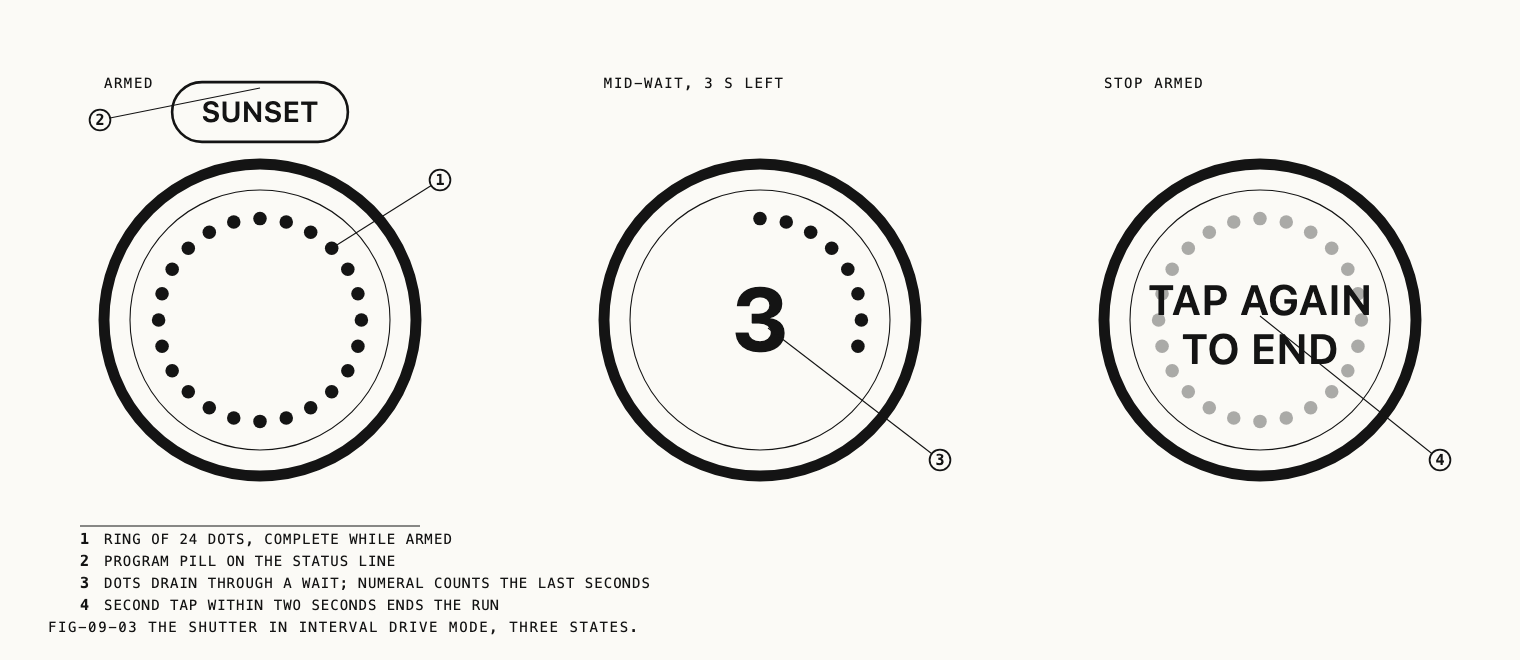
The shutter button takes on a ring of dots, and the status line above the lens switcher
carries the name of the active program. Tapping that name lists your programs and switches
between them without opening settings. With nothing available to run it reads
NO PROGRAM.
Tapping the shutter starts the run. There is no countdown before the first frame and the self-timer plays no part in an interval run. A lead-in is authored instead, as a wait at the head of the program.
While the run is in progress the dotted ring reports the step in progress: the dots drain through a wait, with a numeral counting down the last few seconds of a longer one, the button flashes as each frame is taken, and the ring turns during a burst. Whole-run progress is on the status line, covered in the next section.
Changing the capture mode or the drive mode is unavailable until the run ends. During a Stack run, zoom and lens changes are refused for the whole run as well, and a notice appears if you attempt one. Chapter 2 covers that behavior.
Stopping takes two taps. One tap on the shutter arms the stop and the button reads
TAP AGAIN TO END. A second tap within two
seconds ends the run. Ignore it and the run carries on. Capture does not pause while the
stop is armed.
A run also ends on its own: when the last pass finishes, when the device becomes too hot, when a Stack run reaches the number of frames the device holds in one capture, and when something interrupts the app, such as an incoming call or switching away from Verana. A notice reports which of these it was. Everything captured before the run ended is kept and saved.
The intervalometer keeps its own quick menu arrangement, covered in Chapter 22.
9.5 The Run Readout
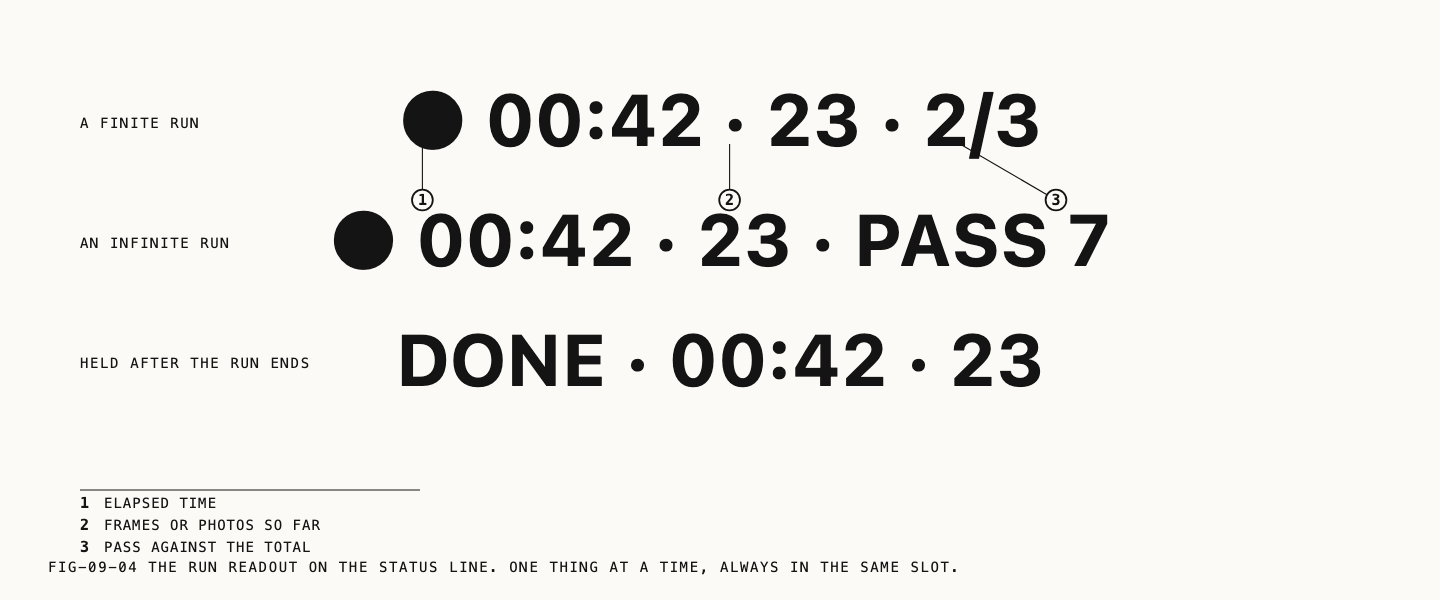
While a run is in progress the status line reports it: ● 00:42 · 23 · 2/3. Elapsed time,
then the number of frames or photos taken so far, then the pass. A finite program counts
its passes against the total. An infinite program has no total to count against and reads
PASS 7 instead.
When the run ends the line holds a summary for a few seconds, stating whether the program completed or ended early, the elapsed time and the final count. The active program’s name then returns to the slot.
The status line shows one thing at a time, as described in Chapter 2.
9.6 Holding Exposure Through a Run
Where to change it: Settings → Camera → Interval.
LOCK EXPOSURE AT RUN START is on by default. With it on, exposure, focus and white
balance are fixed on the run’s first frame and held to the end, so the frames match one
another. The alternative is a sequence in which every frame is metered separately, where
small differences between neighboring frames read as flicker on playback.
Values you set yourself are never overridden. In M the exposure you set stands, as it
always does. In S your shutter stands and the sensitivity settled on at the start is held
for the run. Exposure modes are covered in Chapter 3.
Turn the lock off for a run that crosses a large change in light, a sunrise or a sunset, where you would rather the camera follow it. Variation between frames is the price of that choice.
Whatever was held is released when the run ends.
9.7 Dimming the Screen During Runs
DIM SCREEN DURING RUNS is on by default. Fifteen seconds after the last touch, during a
run, the screen darkens and the run readout is left faintly visible so progress can still
be read at a glance. Any touch restores the screen, and a touch that wakes the screen never
counts toward stopping the run.
A run can last an hour. Dimming preserves battery on long ones, and stops the phone lighting the scene it is photographing.